Wednesday, 14 September 2011

A.T.A.C. vs Interceptor

The full name of this article is 5.11 Tactical A.T.A.C. 8" Side Zip vs Magnum Interceptor 8.0 SZ WP.

Left: A.T.A.C. - Right: Interceptor
Protection
Both boots offer good protection for the feet and provide good ankle support. I have (accidentally) kicked and been kicked on the feet and ankles and it sure helps to have either of these boots on.  The A.T.A.C.s have slightly more padding on the sides so it softens impact a little better.

Although these boots are not steel capped, they do help if someone steps on your toes.

I am unsure if this means better protection, but the sole of the A.T.A.C.s are much harder than the Interceptors.


Zips
The side zips on both boots save a lot of time when wearing and removing them. I do not know how long the zips will last but hopefully a very long time for myself since I do not actually use boots for rough duty.

In this department the A.T.A.C.s are better than the Interceptors. The zips on the A.T.A.C.s moves smoother and the velcro straps to hold the zippers in place are larger than the Interceptors.

A.T.A.C. Zip
Interceptor Zip
The A.T.A.C.s are slightly easier to wear than the Interceptors due to the open flap at the zip area. Of course the Interceptors have a closed flap probably to provide full waterproofing on the side. I am not sure if the non-waterproof Interceptors have an open flap, but I have seen that the waterproof version of the A.T.A.C. also has a sealed side area where the zip is.
Non-waterproof Open Flap
Waterproof Closed Flap


Waterproof
The Interceptors I bought have a waterproof/breathable membrane. I do not know if this is the same Sympatex Plus that Magnums had on the old Stealths, but so far they work just as well.

My A.T.A.C.s are not waterproof but there is a waterproof version which I guess work the same.

These come in very handy in the rain or just going through puddles of water.


Foot Comfort
This is where the Interceptors and I would say Magnums in general are way ahead of the competition. The first time I tried on Magnum Stealth Waterproofs my feet felt good, but as I wore them more, it was clear that these boots were the most comfortable footwear I have ever worn in my whole life. Better than any cross-trainers or basketball boots. Don't try to play basketball in them(I have tried), but walking, running and standing around feels very comfortable in Magnums.

The Interceptor like the Stealths before it, are very comfortable and feel much nicer on the feet than the A.T.A.C.s. For me this is most evident when standing around. After about ten minutes my feet start to ache in A.T.A.C.s.  I can stand about one hour in the Interceptors before the aching starts.

I am happy to say that while walking or running in A.T.A.C.s, my feet feel fine.  Not as comfortable as the Interceptors but still OK.


Other Stuff
Both boots do not have any metallic hardware so no need to take them off to walk through airport scanners.

Both boots have non-slip oil resistant soles.

The Interceptors are slightly lighter than the A.T.A.C.s.  I am guessing this is due to the extra padding in the A.T.A.C.s


Biases
I am an office worker, so why on Earth do I have two combat/security boots?  Too much Rainbow Six led me to buy Magnum Stealth Waterproofs just for fun. When time came to dispose of them, I immediately looked to buy a new pair of Magnums. After a long time I could not find a shop nearby that stocked them, so I thought why not try a different brand and bought a pair of 5.11 Tactical A.T.A.C. 8" Side Zip boots.

After wearing the A.T.A.C.s for a while, it was clear not all combat/security boots are equal!  Back to searching for Magnums I go. When the opportunity came, I snapped up the Interceptors in a flash - good ol' Magnum comfort.

I only wear boots three to four days a week and I do not perform rough duties with them. As such I cannot say whether these boots are very durable. My old Stealths lasted me seven years under these conditions.


Next, I gotta try Magnums with the separate zipper thingy.

Saturday, 14 May 2011

Track Building Days of Past

A long time ago in a galaxy far far away there was a game called Stunts.  And a great game it was.  Insane unrealistic stunt driving with a track editor.

Today the Stunts equivalent is TrackMania.  Sure, TrackMania does not have licensed cars and does not have car collisions, but it does have insane unrealistic stunt driving and a track editor.  Thanks to sites like the TrackMania Carpark and TrackMania Track Exchange, people can also share car models and crazy tracks.

Although I don't have TrackMania Sunrise anymore, I did find these videos made back in my track building days.


Tuesday, 5 April 2011

Offline GPS Maps.

We just got off a train and out of one of many massive train stations in Tokyo.  We are looking for our hotel which is somewhere nearby but we are not sure which building it is.  Out comes the Lonely Planet guide.  After looking at the included map and looking at the streets and buildings several times, we still have no idea where we are.

Time to bring out the Blackberry Torch.  Activate GPS.  Activate data roaming.

"Nooooooooooooooooooooooooooooo!"

The data roaming failed completely.  The phone could not connect to the Internet.  There goes Blackberry maps and Google Maps down the drain.

Luckily, I came prepared with Mobile GMaps.  This application can be used with offline maps that you build yourself.  I took the time to learn how to build my own maps and built one for Tokyo and loaded it onto the Torch.  It worked wonders as a portable street directory with GPS to show the current location.  Just don't expect it to give you directions, you still need an Internet connection for that.

With Mobile GMaps we found our hotel and many other places too.  All this without an Internet connection.

Thursday, 3 February 2011

Logitech G35 Dolby Headphone Headset

"Dolby Headphone", the name given by Dolby Laboratories for their method/processing/thingy that takes surround sound input and modifies it to output through stereo headphones but still sound like surround sound.  I did not believe it at first, but then I found this (Must listen with headphones).


Reading around,  it sounds like this is old technology and that the demo actually is not a Dolby Headphone demo.  Whatever and where ever this came from and even if technically it is not surround sound,  I was impressed.  It is possible to simulate surround sound with just stereo headphones.

So, can surround sound games sound this good with Dolby Headphone headphones?  I bought the Logitech G35 7.1-Channel Surround Sound Headset to try out.

I tried the G35 with 5.1 and 7.1 audio settings.  I cannot tell any difference between the two.  As for the surround sound, it definitely sounds different from normal stereo. But I did not get the true feeling of surround sound.  Sounds coming from the front sometimes sound like they were in front of me.  There have been several times where the ambient sounds did sound like it was coming from behind me.  I turned my head in real life quite a few times because I thought someone came into my room.  Overall the surround effect seems to work half the time and the other half just sounds normal.  It definitely does not sound as good as the Dolby Headphone demo with normal stereo headphones on.

There is surround sound coming from Stranglehold but because of all the bullets flying everywhere, things breaking everywhere and debris flying everywhere, I cannot place what is coming from where.  Although different to the stereo war zone mess, it still sounds like a war zone mess.  As such, the surround sound was not very apparent.

Test Drive Unlimited
There were sounds that sounded like it came from behind.  Most of it occurred when I heard cars crash behind me or when debris from a car crash lands behind me.  Unfortunately I have not noticed sounds of cars driving past me at the back.  Also mid-engine cars engine sound does NOT sound like it was coming from behind, it still sounds in head like a stereo headphone.  Front sounds and the overall surround experience was about the same as Dark Messiah of Might and Magic.

I played it with the Oblivion Lost mod.  So far S.T.A.L.K.E.R. gave the most convincing surround sound experience with the G35.  I would even say it is almost as good as true surround sound.  Maybe it is due to the quietness of the game, but most of the time I could pin point where something was, based on the sound.  Gun fire, barking mutant dogs, people talking, choppers flying, they all sound like coming from their appropriate directions.  Strange though, the G35 did not register S.T.A.L.K.E.R. as being an application that outputted surround sound, yet it has the best surround experience out of all the games I have tried out so far.  This was the closest game experience to the Dolby Headphone demo.  The only thing missing now is the above/below sounds.

Other than games I also tried out the G35 with Star Wars Return of the Jedi DVD.  When I ran the THX Optimizer on the DVD, the test sounds just sound washed out to me.  But playing the movie with surround is a big improvement on playing it  with stereo.  To me it sounds as good as watching other movies with the real surround setup.  Unfortunately I don't remember what it was like to watch Return of the Jedi with a real surround system so I cannot compare the real with the G35.

Overall the G35 does a very good job reproducing surround sound,  but I don't think it is as good as if you had the proper surround speakers setup.  So why did I get a Logitech G35 headset rather than a real surround sound setup?  Plain and simply because I do not have space to place surround speakers around me.  Plus I won't annoy the people around me with screams, gun fire and screeching tires.

There are true surround headphones as well, but since they are too difficult for me to acquire at the moment,  the Logitech G35 will do just fine.


The Headset Itself

The Logitech G35 is the heaviest and largest headset I have ever used.  But it is very comfortable.  The package comes with three interchangeable head pads and I switched to the thickest one.  The length adjuster for the ear pieces feels a bit loose compared to other headsets.  A few times when I picked it up,  the adjustment moved.  The ear pieces fit nicely over the ears and work like mufflers.  Even when there is no sound from the speakers,  I can hardly hear things coming from the outside.  The foldable microphone works very well and is well placed.  when folded up, it automatically mutes.  Although it has been performing brilliantly since day one, the unit feels a bit flimsy to me.  Each time I pick it up,  I can hear creaking, I am not sure from what.

On the left ear piece there are the volume control roller, mic mute button (in case you don't want to fold it up), Dolby Headphone on/off switch and three customisable buttons.  The volume roller and the Dolby Headphone switch  works well, but I have not used the rest of the buttons.  The customisable buttons can only be used for controlling base/treble/mic levels and a handful of applications like Ventrilo and WinAmp.  There is also an inbuilt voice morphing application which can be controlled by the customisable buttons.  So far I have not needed to use any of these.

Being a USB headset, the use is pretty much confined to computers only.  I have only used it on Windows XP so I do not know if it will work on other operating systems.

Compared to my now second best headset, the Logitech Clearchat Premium, the G35 surpasses it in every aspect except for the fact that it is USB rather than a 3.5mm connection.  Everything sounds better with the G35, the microphone is clearer and despite its size and weight, it is actually more comfortable than the Clearchat Premium.


Biases
  • All my experience with real surround sound is watching movies with 5.1 systems at friends' houses.  I have not actually owned a surround sound system.
  • I do not know much about audio technology except what I have typed in this article.
  • I do play a lot of PC games with stereo headphones.
  • I have used several headsets before and the best one before the G35 came along, is the Logitech Clearchat Premium. 
  • Although I say that I can hear the simulated surround sounds coming from the back sometimes,  I still wonder whether it is my mind processing the sound with the visuals.  I mean if I hear a sound in both ears and I cannot see anything in front of me,  it only makes sense that the sound is coming from behind.

Updates
2012-04-07
I can verify that the G35 works on Windows 7 64 bit.  New drivers must be installed though.  They can be downloaded from Logitech.

Just a little over a year old and I have noticed that the skin of the ear padding is ripping.  That is pretty poor materials or workmanship for the ear pads.

Sunday, 16 January 2011

Powermonkey-eXplorer

The powermonkey-eXplorer package by powertraveller is a solar and battery charger package for charging mobile phones, mp3 players and other small electronic devices.  The pack contains:

A solar charger called the solarmonkey.


A rechargeable battery called the powermonkey-eXplorer (same name as the package, making it a bit confusing).


And a bunch of connectors, AC adapter with multiple plugs and a few cables.

From here on when I say powermonkey-eXplorer, I am referring to the battery.

The powermonkey-eXplorer can be charged via the AC adapter, via USB from a PC or via the solarmonkey getting power from the sun..  Here I will only discuss charging with power from the sun.  Just connect the powermonkey-eXplorer to the solarmonkey and leave it in the sun.

The solarmonkey itself can be used to charge devices directly, but it does not have any over-charging, short-circuit and other electric type protection.

So,  how good is the whole package as a solar charging device?

From trying out,  it seems to take about 4 days of 6 hours per day of direct sunlight for the solarmonkey to fully charge the powermonkey-eXplorer.  Of course I do not always get 6 hours of direct sunlight everyday, but I am glad to say that even if the sun shines on and off, if I continued to charge the powermonkey-eXplorer, it will charge.

A Blackberry Torch 9800 charges fine with the powermonkey-eXplorer BUT will not charge with the solarmonkey.  A full powermonkey-eXplorer charges my 9800 from completely empty to completely full.

One strange thing though, if I daisy chained the solarmonkey to the powermonkey-eXplorer to the Torch 9800, then the Torch won't charge.  It seems that if the solarmonkey is connected to the powermonkey-eXplorer, the powermonkey-eXplorer just won't charge other devices properly.

An Iphone 4 can be charged with the powermonkey-eXplorer using the provided tip, but the Iphone complains about connecting an incompatible device and the phone signal drops out.  If I used the Iphone's USB cable and connected it to the powermonkey-eXplorer USB socket, it does charge without complaining and the phone signal seemed to work fine too.  A full powermonkey-eXplorer charges the Iphone 4 to only about 85% capacity.  I have not tried connecting the solarmonkey directly to the Iphone 4.

A Dopod 818 pro charges fine from both the powermonkey-eXplorer and the solarmonkey.

An old Nokia 1100 cannot be charged by the powermonkey-eXplorer nor the solarmonkey.

Another old Nokia 3310 can be charged by the powermonkey-eXplorer but it is problematic.  Every minute the powermonkey-eXplorer will stop charging, and you have to turn it on to continue.  When I did constantly turn on the powermonkey-eXplorer to charge the 3310,  it did charge up.  Very annoying though and not worth the effort.  The solarmonkey cannot charge the Nokia 3310 directly.

One of the best things about the powermonkey-eXplorer is the LCD and LED indicators.  The LCD shows the level of battery power and the LED shows whether it is being charged and when it is fully charged.

I was crazy enough to buy two packs of solar charging goodness and I noticed that one of the solarmonkeys worked under light overcast conditions where as the other did not.  Although how much it charges under the overcast condition, I do not know.  According to powertraveller they are constantly improving the units so it looks like I got the solarmonkeys from different production batches.  So, not all solarmonkeys are equal, but they both do work well under direct sunlight.

Over time, the rubber shells of the solarmonkeys and the powermonkeys have become sticky.  I am unsure if it is due to heat from the sun or it came in contact with something that it did not like.  I just hope the rubber shells keeps well rather than break off.

Update 06/12/2011
The powermonkey does not charge the Moshi Double Bassburger properly.  But it does charge the McGear Mini Speaker II Stereo properly.

Update 05/05/2012
After updating the OS on my Blackberry Torch 9800, one of the powermonkey-eXplorer units will NOT charge the 9800 anymore.  Hmmmm. Actually it could be that the powermonkey-eXplorer battery is dead.  I will need to do further testing on this.

Update 10/07/2012
I have confirmed that the powermonkey-eXplorer battery that will not charge my Torch 9800, is actually dead. After charging in the sun, the indicator reports that charge is full, but when I try to charge something with it, it drops to empty very quickly.  It did not matter whether I was trying to charge my Torch 9800, an Iphone 4, or the McGear speakers.

So, one solar battery only lasted one and a half years.  The other solar battery is still going strong.

The shells of the units have become more sticky over time, but I am happy to say that it does not look damaged in any way.  Dirty but not damaged.

Update 02/09/2012
The powermonkey-eXplorer can charge a Kindle Touch.  I only tried it using the USB head and the USB to mini-USB cable to charge the Kindle.  One full charge of the powermonkey-eXplorer charges about 3/4 of the Kindle Touch's battery.

Update 21/01/2015
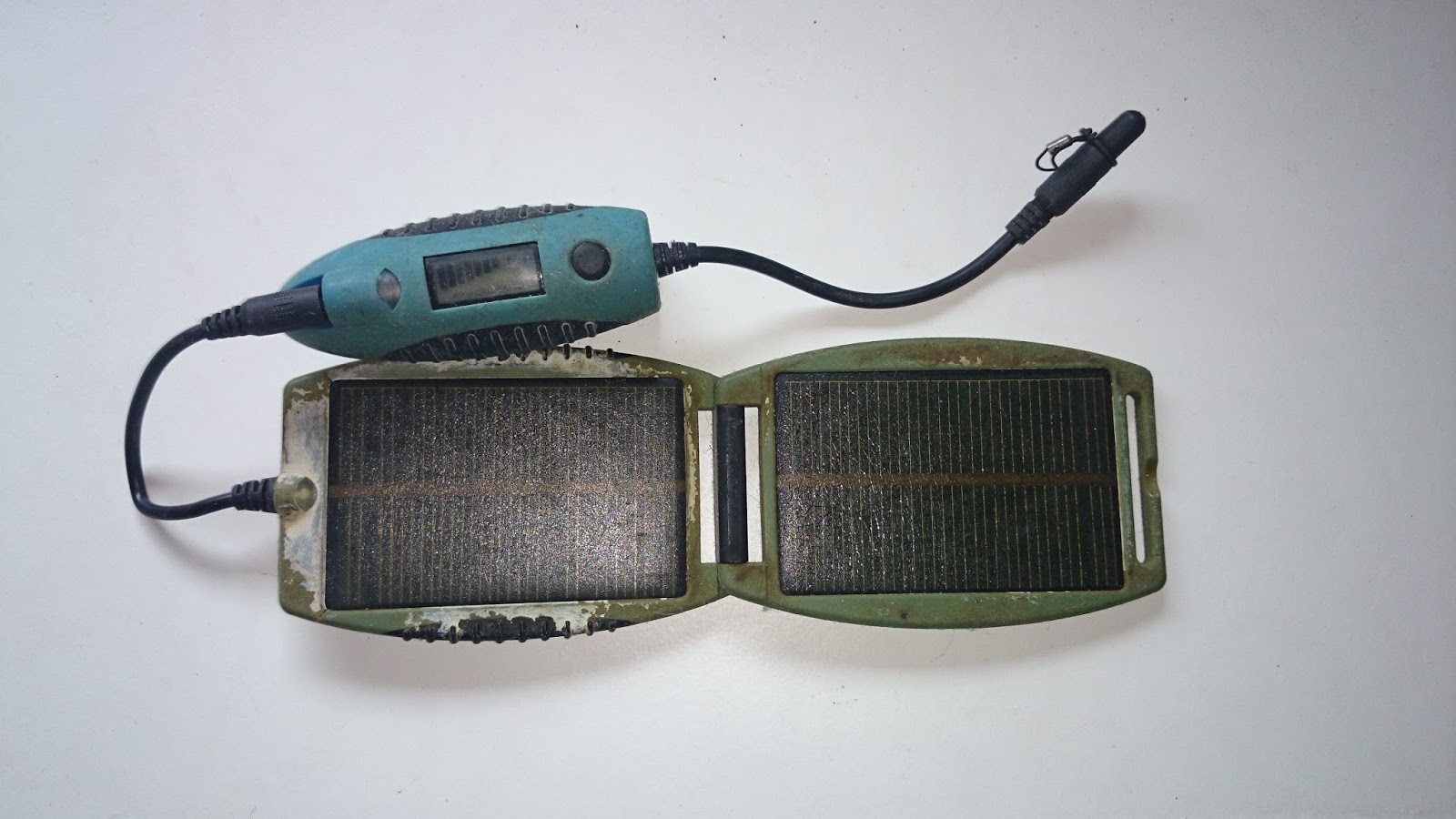
Both powermonkey-eXplorers are dead.  One died about two years ago, but the second one died recently.  Both have the same problem of the battery not holding any charge.  At two years plus and four years plus, the batteries did not live very long.   The units also grew more sticky and dirty with the solar panel casing forming cracks.  Here is a picture of the same blue powermonkey-eXplorer after all these years.

Biases
My experience with solar stuff has only been with a solar calculator, a solar rechargeable wrist watch (10 years and still going strong) and a crappy Zazz solar charger which seems to only get enough solar power to light the inbuilt green LED.