Tuesday, 21 July 2015

Power Button Mashing, Ants' Mess and Laptop Guts

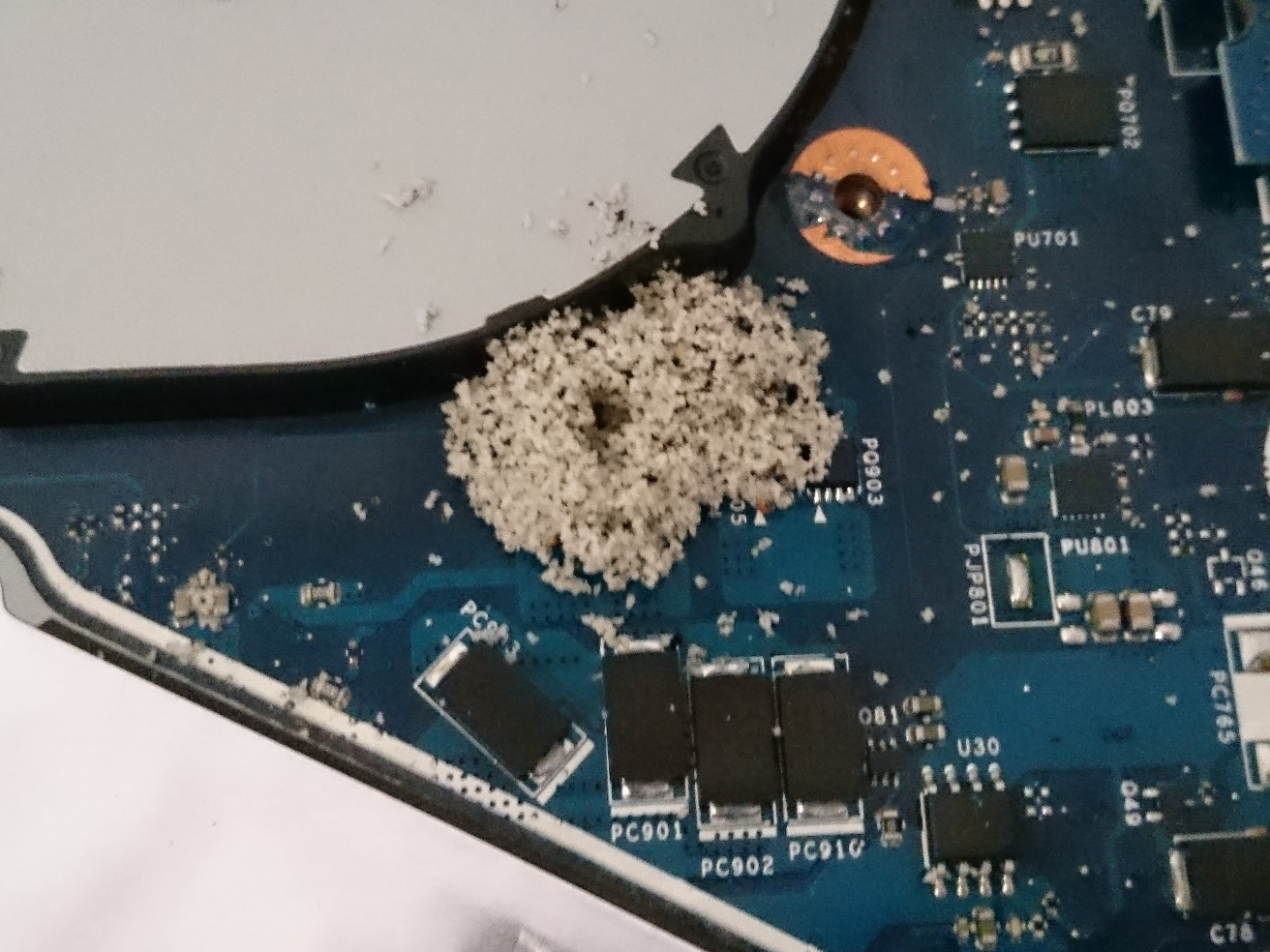
Ants.  I did not have anything against them, until they started infesting my computers.  Two PCs have died and another two are sick.  This story is about one of the sick PCs, an ASUS K95V.

The K95V started having problems turning on.  Initially, a few presses of the power button would turn the PC on.  As time passed, the number of power button presses increased and increased and increased.

When it started to take around five minutes of repeated pressing of the power button, I tried something crazy.  Without the power cable plugged in, I would flip the laptop upside down and shake it a few times.  This crazy idea actually worked and after the upside down shake, one press of the power button would turn the PC on.  I could plug the power cable back in after powering up.

The upside down shake technique only worked for a few months and it was back to repeated presses to power up the PC.  It reached the stage where I completely stopped shutting down, hibernating and putting the PC to sleep.  The power button was getting too annoying.

Then came the time.  I was fixing some stuff on the PC and accidentally shut down the PC.  After a few hours of power button mashing, the K95V still would not power up.  With nothing to lose I opened up the K95V.
Other than clumps of broken foam in a few areas, the insides looks fine.  I did not see any damaged components at all.
Checking the power switch PCB also did not reveal anything.  Everything looked fine.  So, I just cleaned up the ants' mess and reassembled the PC.  I tested powering up and shutting down the K95V several times and it appeared to be working fine.  Unfortunately, the next day, the K95V refused to power up again after shutting down for the night..

I disassembled and reassembled the K95V again.  I do not know why but it decided to power up again.  This time it will be left on  as there is still a problem with the power switch functionality somewhere.

Thursday, 23 October 2014

One way to Fix a Laptop Battery That Will Not Recharge

The Short
While the laptop is on and connected to the power supply, remove the battery, wait a few seconds and reinsert the battery.


The Long
Yesterday morning while using my laptop with the power supply, I noticed the battery percentage was not increasing over time like it usually did.

I tried powering off, removing the battery, waiting a while and reinserting the battery, then powering on.  This did not help.

I tried draining the battery all the way down, by leaving the laptop on the BIOS screen until the laptop shut down by itself.  When I plugged the power supply back in and powered up, the battery meter displayed "0% available (plugged in, charging)".  The display stayed at 0% and never increased, even after working on the laptop for one hour.

I tried updating the Windows 7 battery drivers.  Windows said they were all up to date.

Finally, I performed the steps that did work for my case.  While the laptop was on and the power supply plugged in, I removed the battery.  I checked the battery meter and sure enough it said there is no battery.  I reinserted the battery and checked the battery meter.  It took about twenty seconds for the meter to register that a battery was there.  Then it took another ten or so seconds before the  "0% available (plugged in, charging)" appeared.  This time the percentage did increase over time.

The battery is still working fine and recharging properly again.

This method will not fix all battery problems, but it sure did for my instance.

Friday, 11 April 2014

From Torch 9800 to Xperia Z1

My experiences and opinions from learning to use a Sony Xperia Z1 after using a Blackberry Torch 9800 for three years.

The Xperia Z1 cannot turn off the mobile signal without turning off Wi-Fi.  There is a workaround though.  Airplane mode turns off everything, but you can turn on Wi-Fi again while in airplane mode.  Dodgy, but it works.

On the plus side, the Xperia Z1 can turn off mobile data independent of Wi-Fi.  This is something that the Torch 9800 could not do.

The Sony PC Companion software can sync calendar and contacts via USB cable to Outlook.  There is an option whether you want to sync with Google as well.  Unfortunately it cannot sync notes, which I also need.  Although I do not use it, I have noticed it cannot sync tasks either.

Since I need notes to sync to Outlook, I tried out MyPhoneExplorer and discovered that it can sync everything via USB Cable.  MyPhoneExplorer does install its own notes app and tasks app on the phone, but they are fully functional.

I type much faster with the Torch keyboard.  The Torch trackpad also helps me edit text faster.  No need to wait for the magnifying glass to show up to place the cursor in the correct spot for editing.  The on screen keyboard of the Z1 is much better than the Torch's on screen keyboard, but I find the actual physical keyboard of the Torch much quicker to use than the Z1's touch screen.

The Xperia Z1 has a larger screen than the Torch 9800.  This is good for looking at information, but the larger size means it is more difficult to fit in a pocket.  I did get use to the larger size after a while.

The Xperia Z1 cannot schedule auto power off/on without rooting Android.  This is one built-in functionality that I really like in the Torch 9800. Good for saving power and preventing calls from coming in while I am sleeping.  I am not prepared to root Android just yet, so it's manually turning on and off airplane mode for me.

The camera in the Xperia Z1 is far better than the Torch 9800, although this really does not say much because my old Dopod 818 Pro camera was better than the Torch 9800 as well.  A better comparison would be to the Canon PowerShot SX1.  The macro shots with the Xperia Z1 are not as good as the PowerShot SX1, but it comes very close.  For scenery and other shots that do not require zoom, I would say the Z1 is as good as the SX1.  The Z1 has no optical zoom, so there is no comparison with the SX1 in this department.

PowerShot SX1

Xperia Z1
The above two photos were taken at the same time with the Z1 to the left and the SX1 to the right.  The Z1 was set to multi auto focus, 20 megapixels manual mode.  The SX1 was set to full auto mode.

PowerShot SX1
Xperia Z1
The above two photos were taken at the same time with the Z1 to the left and the SX1 to the right.  The Z1 was set to Superior Auto mode.  In this mode the Z1 shoots in 16:9 ratio and in 8 megapixels.  The SX1 was set to full auto mode.

The GPS in the Xperia Z1 works much faster than the one in the Torch 9800.  This is without using location aiding from Wi-Fi and mobile networks.  Mobile GMaps is not available on Android so I have to find an alternative offline maps app.  Currently, Google Maps just does not have a good enough offline map functionality.

There are no sound profiles on the Xperia Z1, other than sound on, vibrate and complete silence.  There are a few apps available, but I have not tried any yet.  Until I find an app that works the same as the Torch 9800, I have to manually adjust the ring volume in different situations.

The Xperia Z1 comes pre-installed with OfficeSuite 7 Free, but it cannot edit files.  Time to find a new app or purchase the paid version of OfficeSuite 7.  I guess I have been spoilt by Documents to Go on the Torch 9800, which can edit Word and Excel files.  Add BeamExplorer to the mix and I can also create Word and Excel files on the Torch 9800.

On the plus side, OfficeSuite 7 Free does enable the Xperia Z1 to view PDF files, which was something  the Torch 9800 could not do out of the box.

The calendar reminder alert on the Xperia Z1 is horrible.  When it is reminder time for an event, everything is fine and the Z1 will sound an alert.  The bad point is when I snooze the event, whether it be snooze all or snooze for 5, 15, 30 minutes, the alert will not sound again.  Instead, the alert will only sound when I turn on the phone again.  So, if I forget about the event and do not use my phone, the reminder will completely fail me.  It looks like there are apps that fixes this problem, but I have not had the time to try them out.  The Torch 9800 and every smartphone and PDA before it always sounded the reminder alert when I snooze them.

Overall the Xperia Z1 is more customisable than the Torch 9800 even though some things cannot be customised.

The Xperia Z1 is waterproof, but I have never submerged it in water.  I have used wet hands with it and so far so good.


Biases
I have been using PDAs since 2002 and moved to smartphones.  I use personal information management(PIM) functionality more than the phone functionality.

I prize being able to USB sync PIM data between my device and Outlook on my PC and this is a necessity as Wi-Fi is not always available to me.

The Xperia Z1 is the only Android device I have used.  There may be many similarities between the Z1 and other Android devices, but I do not know what they are.

I started using the Xperia Z1 on February 2014.

Sunday, 19 January 2014

Tiles. Now in Full HD!

That's right.  Why settle for standard definition when you can get tiles in Full HD.  Although they do not move, the patterns look far crisper than your ordinary tiles.


Alright, I will admit that some images/patterns on these tiles do look nice, but I do not think it is 1080p.  I wonder if  HDMI grout is required for these tiles.

Thursday, 31 January 2013

Ants and Baking Soda

Many sources on the Internet say ants do not like baking soda and that if they eat it, they will die.

So what on earth are these ants doing in my box of baking soda?????
I guess there is no surprise that there are dead ants lying around since they got to the baking soda.  I do hope they will clear out of the power board they infested.  It looks like they have taken some baking soda inside the power board too.

Wednesday, 19 December 2012

What Ants Taught me about Laptop Power Adapters

The Short
Ants suicide-zapped my laptop power adapter successfully taking down the adapter with them.

I searched and learnt that other laptop power adapters can be used as long as
1) The voltage is the same.
2) The current rating is equal to or higher than what the laptop requires.
3) The polarity of the adapter is the same.
4) The physical tip is the same.

My old laptop which I thought was partially working is actually fully working, but was acting strange because its power adapter was faulty.


The Long
The Main Event
Another routine morning and it was time to power up the PC for work.  On goes the mains switch and ZAP!  Hmmmmm what was that noise?  Uh oh, there is no power going to the laptop, what's wrong?  Pressed the power button on the laptop and it ran fine on battery power.  Phew!  So the PC is fine,  so it must be a power adapter or cable problem.

When I checked the laptop power adapter, this is what I found.

Wonderful!  Ants killed my power adapter.  Time to buy a new one.  While searching where to get a replacement, I was also researching whether other laptop adapters can be used, since I have an old, partially working laptop with a power adapter.  It has the same tip, polarity and voltage, but the current rating is higher than the zapped adapter.

There were quite a few forum answers and articles out there that said "Yes I can.".  One of the better articles I found was this:
http://ask-leo.com/can_i_use_a_charger_that_provides_the_same_voltage_but_a_different_amperage.html

My lesson of the day was, different laptop power adapters can be used as long as
1) The voltage is the same.
2) The current rating is equal to or higher than what the laptop requires.
3) The polarity of the adapter is the same.
4) The physical tip is the same.

I plugged in the old power adapter and voilĂ , power is flowing to my PC once more.  YAY!  I am saved.  No need to buy a replacement adapter, but then the plot thickens.

The next morning, I turned on the mains and powered up the PC.  Hey, the battery lights on the PC are blinking! What is wrong now?  I proceeded to check everything from turn on and off the PC several times, removing and reinserting the battery several times and also changing main power points.  The problem was still present.  Time to bring out the big guns, or should I say another gun.

Very lucky for me,  I have another laptop that is fully working complete with TADA! power adapter.  I took this power adapter and plugged it into my main laptop.  Lo and behold!  Power flows once more and the battery was charging normally again.  Sooooooooooooooooooooo, there was a problem with my old laptop's power supply.  Which means I still have to buy a replacement power adapter .

Next day, I acquired a new adapter, tried it on my laptop and all is back to working perfectly.  I decided to get an adapter that was powerful enough to power the old laptop as well, since I knew that adapter was faulty.


Old Laptop New Life
My old laptop is about six years old and it had been working perfectly until last year.  After five years of great service, one day when I turned on the mains power, I heard sizzling noises coming from the battery and the PC would not turn on.  When I removed the battery and just ran it from the power adapter, the laptop worked fine and worked all day.

Next morning.  I tried to power up the PC which already had the battery removed and the PC would not boot.  The power indicator light was on, but nothing appeared on the screen.  I turned the PC off and on again and this time it did power up.  At this point I thought my PC was dying.

Day after day I had to turn on the PC two to five times before it would boot.  One day though, the laptop did turn on first go and I was surprised.  It was a hot afternoon so I thought maybe the PC needed to be warmed up before it would boot.  The next day when I turn on the laptop for the first time, I left the power running for a few minutes with nothing appearing on the screen.  When I turned it off and on again, it booted. So, warm up required before PC would boot.  From this day on I only had to power on twice to get the PC working.

In light of the new events that indicated that this old laptop's power adapter was faulty, I wanted to find out if the laptop itself was working fine.  So, new power adapter, meet old laptop.

I guess I should not be surprised, but with the new power adapter, my old laptop powered up perfectly first go.  This meant that the warm up time which I thought was for the PC, was actually for the faulty power adapter.  I am also happy to say that the new power adapter charged my old laptop's battery just fine.  No sizzling noises.  Unfortunately the battery life only lasts around ten minutes now.  Oh well,  I guess it still makes a good UPS power supply.

Six years on and my old laptop is still teaching me stuff, namely when a laptop starts going funny and there are battery issues,  first check the power adapter!

Friday, 19 October 2012

$0.01US For 8 Games and a Credit Card Test

GOG.com has an insane promotion of pay anything for eight selected Interplay games.  They said "Pay as little as $0.01--get 8 Interplay Games."  I just had to test it out to see how the credit card transaction would progress.

The transaction went through all good.  My credit provider charges an international transaction fee on top of the foreign exchange rate.  I am happy to say that the international transaction fee was ZERO!  In the end I really did only pay 1 cent for 8 Interplay Games.

So,  there IS something you can buy for 1 cent these days.

This sale is no longer on.

Friday, 8 June 2012

Laser Mice With Blue Teeth

Logitech V470 laser mouse with Bluetooth connection.

Mousing
The laser mechanism is supposed to be much better than the standard optical mechanism.  So far the only improvement I have noticed is the mouse does not cause the pointer to jump.  All optical mice I have used so far, always had the pointer jumping problem.  Other than that, the pointer movement is the same as an optical mouse which is good.

All the buttons and the scroll wheel work well.

The scroll wheel can also be pushed left and right which act like buttons.  These can be configured with the included SetPoint software.  The default setting is to scroll left and right.

Strangely the default configuration for the middle button is to activate zoom rather than being a middle button.

I have played first-person shooters and real-time strategy games with it and it works great.


Bluetooth
Bluetooth means one extra USB port for me.  Of course this is only applicable if the computer comes with inbuilt Bluetooth.  The connection was very easy when following the instructions.

When I was setting up Bluetooth on my current PC for the first time, a warning came up saying that Bluetooth and Wi-Fi can interfere with each other and cause disconnections.  After years of using Bluetooth and Wi-Fi I never knew about this.  It is definitely a topic to consider when choosing whether to use Bluetooth.  Luckily for me I have not had any issues of them interfering with each other.

One disadvantage with a Bluetooth mouse is, it takes longer for the mouse to connect to the PC.  On boot, the mouse takes several seconds before I can move the pointer on the login screen.


Batteries
The V470 uses two AA batteries which makes the mouse slightly heavier than my old optical mouse.  It is still very easy to pick up and shift thanks to the ergonomic shape.

There is an on/off switch to save batteries when the mouse is not being used.

There is an LED indicator that blinks blue when the mouse is connecting and blinks red when the batteries are low.  A pair of fully charged Typ.2,000mAh Eneloops lasted me about 2 months.  From my timings, the LED started flashing red at around 557 hours.  The mouse completely stopped working at around 560 hours.  These timings are not the most accurate since I do sometimes leave the timer running when the mouse is off, and sometimes I turn off the timer and forget to turn off the mouse.


Other Stuff
There is no visible light underneath.  It uses an infra-red laser.


Biases
Before this V470 I have been using a standard 2 button + scroll wheel optical Dell mouse for the past eight years.   The Dell mouse has started showing problems but eight years of service shows how good the Dell mouse was.

I have used Bluetooth connections since 2006 and in Wi-Fi environments.


Update 01/12/2012
I have encountered a strange problems with the mouse recently.  When the PC comes out of hibernation or stand by, sometimes the mouse movement is very laggy.  I have tried turning the mouse on and off, restarting the computer and re-registering the bluetooth connection it still lags badly.  The only solution I have found so far is I need to shutdown the PC completely and turn it back on.  Everything is good after a full shutdown.  Not sure if the problem is with the mouse or my PC.


Update 02/01/2013
In the past month the left button click has been problematic.  On some days holding down the left button does not work, so dragging just lets go and sometimes a single click becomes a double click. This happens on some days and other days it works fine.  I am not sure whether this is the start of the known issue stated here.  I am not prepared to open the mouse just yet, but it is annoying when I cannot drag and drop and double clicks are happening everywhere.


Update 12/03/2013
I am unsure if this is a problem with the mouse or my PC or Windows 7, but half the time when I bring the PC out of hibernation, the mouse would not work.  The easiest fix I found for this was to turn off and on the bluetooth radio on the PC.

Thursday, 12 April 2012

Need for Speed Toy Edition

Need for Speed.  You have played the video game, now play with the toys!
I was surprised to see this in a department store.  It is an official EA licensed product line.  I do not know if Mega Bloks requested the license from EA or whether EA requested Mega Bloks to make toys for the game.
The one question I have is, why Need for Speed and not Command & Conquer?  I am sure kids would love the Mammoth Tank!

Sunday, 12 February 2012

Outlook 2002 Switches

"c:\Program Files\Microsoft Office\Office10\OUTLOOK.EXE" /CleanFreeBusy
will regenerate the busy days indicators on the Outlook Calendar after a Blackberry sync.

"c:\Program Files\Microsoft Office\Office10\OUTLOOK.EXE" /resetfolders
can fix sync problems between Outlook and a Blackberry.  In my case the memopad to notes.  Special thanks to Michael-D-Clark for the solution.

Here is the full list of switches from Microsoft
http://support.microsoft.com/kb/296192

Tuesday, 6 December 2011

Battle of the Egg Speakers

Moshi Double Bassburger vs McGear Mini Speaker II Stereo(MCSP 22).

Moshi Double Bassburger Specifications (as stated on the box)
Speaker Output: 1.7W x 2
Sensitivity > 80db
Input L/R: 380mV
Frequency Response: 280Hz - 16kHz
Charge: USB = 5V +0.5V
Charge Time: Aprrox 2.5 - 3 hours
Play Time: Approx 10 hours
Ambient Temp: 0°c ~ 45°c
Dimensions: 55mm x 55mm x 77mm
Weight: 112g


McGear Mini Speaker II Stereo Specifications (as stated on the box)
Speaker Output Power: 2W x 2
Speaker Diameter: 40mm
impedance: 4Ω
Rating Power: 1.5W x 2
Frequency Response: 180Hz~20KHz
Signal to Noise: ≥80db
Distortion: ≤1%
Power Supply Input: Mini USB, 5V/500mA (Charger not included)
Battery Capacity: 400mAH
Battery Charging Voltage: 4.2V
Battery Charging Time: 3~4 hour
Battery Playback Time: 6~10hours
Dimension: 
     60mm(D)*55mm(H) (One set)
     60mm(D)*99mm(H) (Dual set)
Weight: 144gm


Size
Both speakers are tiny.  The Bassburger is slightly smaller than the McGear speakers though.  You can see the difference in the photos.  The TicTac box is a reference for the size of the speakers.
Furthermore, the Bassburger can be closed to be even more compact for travelling.  It cannot be used while closed though.  Note that when the Bassburger is expanded for use, it is slightly taller than the McGear speakers.


Sounds Good
The Bassburger gives superb sound for its size.  When they say "Ultra compact stereo speakers that produce sound way beyond their tiny size", they really mean it.  I am very happy that this little egg sounds much better than my laptop speakers.

Although the quality of sound is there, if the volume is turned up too high, distortion can be heard from the Bassburger.  I usually do not have the volume up very high and at normal levels it all sounds good.

As mentioned above, the Bassburger is slightly smaller than the McGear speakers.  For the slight size increase, the sound produced by the McGear speakers are much better than the Bassburger.  I would go as far as saying that the McGear speakers are as good as my old Altec Lansing ACS41 speakers.  Very nice considering it is less than half the size of the old Altec Lansings and does not need a power point.

I also have not detected any distortion when testing the McGear speakers with high volume.  I pumped up the volume higher than when testing the Bassburger, but not much higher because I like to keep my hearing in good shape.


Connections
The Bassburger has one cable with a USB connector and two mini-USB connectors.  The USB connector is for charging the speakers' battery and the mini-USB connects the two speakers together.  The other is a 3.5mm to 3.5mm cable to connect your favourite sound source to the speakers.

The mini-USB cable is approximately 44cm long.  Long enough to give good stereo separation but it may not be long enough if you like to put your speakers around a big item.  The attached USB socket to one mini-USB socket is only around 14cm long.  This means that one of the speakers must be close to the USB power source to charge the battery.  If you want to charge and play simultaneously, this short cable length maybe an issue.

The 3.5mm cable is approximately 64cm.  The 3.5mm socket is in the right speaker only so depending on where you place your sound source, the cable may or may not be long enough to reach the right speaker if you wish to place them with good stereo separation.  The area around the 3.5mm socket in the speaker is quite small, so some standard 3.5mm to 3.5mm cables may not fit if the 3.5mm plug has a large casing.

McGear only has one cable with a 3.5mm plug to plug into a sound source,  a USB connector for charging the batteries and two mini-USB connectors that connect to the actual speakers.  From the 3.5mm plug to the USB connector, the length of the cable section is approximately 13cm.  Then from the USB connector to where the cable separates for stereo placement, the length is around 31cm.  The length from the separator stop to the mini-USB plugs is around 40cm long.  Although I have not separated the cable fully, I think the allowable length between the two speakers would be approximately 80cm.  Overall, the cable design for the McGear gives better flexibility for speaker placement than the Bassburger.

Both speakers cannot play audio through the USB connection.  It is used for charging the internal batteries only.


Features
The Moshi Double Bassburger has got volume control.  The McGear Mini Speaker II does not.

Both speakers can be used while being stuck together or they can be separated.  The Bassburger does need to be expanded to be used though.
Magnets hold the speakers together.  The Bassburger magnets are quite strong while the McGear magnets hardly hold the speakers together.  Be careful with the McGear as a sudden knock can separate the speakers or if you are not holding them properly, one will just fall off.

The McGear speakers have got a power switch for each speaker.  This means you can choose to just use one speaker if you feel like it.  It also means that one speaker can run out of battery before the other one.  The Bassburger must have both speakers connected before it can be used.

The best thing about both these speakers are, you get amplified audio without needing a power point.  Just recharge the internal batteries via USB.


Battery Life
For the Moshi Double Bassburger, I have only recharged the batteries to full capacity twice.
On the second recharge I timed the battery life.  Each day I used the speakers for between one and six hours per day with my laptop or mp3 player.  The Bassburger lasted around 44 hours!  This is far better than the 10 hours battery life they say on the box, but I guess it is also because I don't use the speakers at 100% volume.

One thing does not work as mentioned.  In the manual for the Bassburger, it says that the LED will glow red when the battery level is low.  I have never seen it go red.  One minute it is blue and sounds are playing as normal, the next minute it all goes off.

I also tried charging the Moshi Double Bassburger with the Powermonkey-eXplorer battery.  It did not work very well.  I have to turn on the speakers while charging, if not the Powermonkey keeps turning itself off.  I am unsure if the Powermonkey can give the Bassburger a full charge as even with the speakers on, after a while the Powermonkey turns off, presumably because it cannot charge the speakers anymore.  But there is no way to tell if the speakers are fully charged.

From the first charge of the McGear speakers to full capacity, I timed the battery life for them.  Like the Bassburger, I used the speakers for between one and six hours per day with my laptop or mp3 player.  The McGear speakers lasted the amazing time of around 105 hours!  Ten times longer than the 10 hours mentioned on the box.

The Powermonkey-eXplorer battery seems to charge the McGear speakers fine, but a full charge of the Powermonkey does not charge the McGear speakers to full capacity.


Biases
The main purpose of buying these speakers is to replace my Altec Lansing ACS41 speakers and also to save space.

I am not an expert on audio systems.  The best sound I have heard constantly is from an old Sony sound system model MHC-G77.


Links
Moshi Double Bassburger.
McGear Mini Speaker II Stereo(MCSP 22).


Update 02/12/2012
I am not sure when it started, but my McGear speakers exterior has become sticky.  It feels like the same sticky problem of the  Powermonkey-eXplorer. This is even without the heat exposure.

Update 20/06/2023
Moshi Double Bassburger died.

Friday, 14 October 2011

4D F.E.A.R. Boxing

I just recently got into playing F.E.A.R. the single player game.

From playing F.E.A.R. Combat years ago, I knew that you could kick people if you didn't want to use the guns.  What I did not realise is that if you had no guns or holstered them away, the guy would start throwing punches.  So I started running around seeing how far I could get just throwing punches.

While playing F.E.A.R. just using fists, this funny tune from yesteryear came into my head.  With this funny tune, F.E.A.R.  and a little something extra, I present to you 4D F.E.A.R Boxing - a video montage.

Sunday, 2 October 2011

How to Build Offline Maps for Mobile GMaps

These steps are to remind me how to build offline maps for Mobile GMaps for my Torch 9800.  If you follow these steps you do so at your own risk.  These steps may be updated from time to time.

Requires gMapMaker from http://www.mgmaps.com/cache/

Depending on the area being mapped, so far the space one city takes up is around 500 to 600 Mb.

Be warned.  It takes hours to download maps.
  1. Go to http://www.mapcacher.com/ 
  2. Mark a square around the whole country.
  3. Set Zoom level from 0 to 9.  Ignore Level of detail setting.  Set Type of map to Google Road Maps.
  4. Click Generate and save the map file giving it appropriate name.  
  5. Click Reset and zoom into level 6 of where to map.
  6. Mark a square about 1/4 of the map's viewable area. (Assuming screen size 1280x800).
  7. Set Zoom level from 10 to 12.  
  8. Click Generate and save the map file giving it another appropriate name.  
  9. Click Reset and zoom into level 10 of where to map.
  10. Mark a square about 1/4 of the map's viewable area. (Assuming screen size 1280x800).  This is for the smallest size maps with the highest details.  If larger area is required at this detail, the file size will increase significantly.
  11. Set Zoom level from 13 to 17.  
  12. Click Generate and save the map file giving it another appropriate name.  
  13. Run gMapMaker.
  14. Set Max Parallel Downloads to 2.  Tick Group by zoom.  Set Operating Mode to MGMaps mode, download tiles using a .map file.  Set Hash size to 1.  Set Tiles per file to 256.
  15. Click Go and select the first .map file and click open.  Wait for download to complete and click close.  Approx 27 min.
  16. Click Go and select the second .map file and click open.  Wait for download to complete and click close.  Approx 45 min.
  17. Click Go and select the third .map file and click open.  Wait for download to complete and click close.  Approx 5h 30 min.
  18. There should be a folder in the gMapMaker program folder called MGMapsCache.  Rename MGMapsCache to something appropriate like TkMap.
  19. Connect Torch 9800 to the PC with USB.  You must get the Torch 9800 to appear as a mass storage device on a computer.  
    1. On my Windows XP PC I had to use Sync Media option on the Torch 9800 so that it appears as a mass storage device.  I don't know why if I select USB drive option, the mass storage device does not work.  
    2. On Windows 7 I had to select the USB Drive option and prevent Blackberry Desktop Software from opening.  For some strange reason, when Blackberry Desktop Software opens and connects, it removes the phone as a mass storage device.
  20. Use windows explorer to copy the whole folder TkMap from the PC to the Torch 9800.  NOTE:  Do not use the BlackBerry Desktop Software to copy as this will encrypt everything and MGMaps on the Torch cannot read the encrypted files.  Copy time approx 14 min.
  21. Finished.  MGMaps should be able to access the maps now.

Warning
If you do use Mobile GMaps, do not install Google Maps.  I was doing some testing and noticed that installing Google Maps on to the Torch 9800 deletes Mobile GMaps from it.  All the stored locations for Mobile GMaps was also deleted.

Friday, 23 September 2011

Old Drawings

I don't know what to do with these, so I'll just put them here.

They are very old and I cannot even remember what I copied from.


Wednesday, 14 September 2011

A.T.A.C. vs Interceptor

The full name of this article is 5.11 Tactical A.T.A.C. 8" Side Zip vs Magnum Interceptor 8.0 SZ WP.

Left: A.T.A.C. - Right: Interceptor
Protection
Both boots offer good protection for the feet and provide good ankle support. I have (accidentally) kicked and been kicked on the feet and ankles and it sure helps to have either of these boots on.  The A.T.A.C.s have slightly more padding on the sides so it softens impact a little better.

Although these boots are not steel capped, they do help if someone steps on your toes.

I am unsure if this means better protection, but the sole of the A.T.A.C.s are much harder than the Interceptors.


Zips
The side zips on both boots save a lot of time when wearing and removing them. I do not know how long the zips will last but hopefully a very long time for myself since I do not actually use boots for rough duty.

In this department the A.T.A.C.s are better than the Interceptors. The zips on the A.T.A.C.s moves smoother and the velcro straps to hold the zippers in place are larger than the Interceptors.

A.T.A.C. Zip
Interceptor Zip
The A.T.A.C.s are slightly easier to wear than the Interceptors due to the open flap at the zip area. Of course the Interceptors have a closed flap probably to provide full waterproofing on the side. I am not sure if the non-waterproof Interceptors have an open flap, but I have seen that the waterproof version of the A.T.A.C. also has a sealed side area where the zip is.
Non-waterproof Open Flap
Waterproof Closed Flap


Waterproof
The Interceptors I bought have a waterproof/breathable membrane. I do not know if this is the same Sympatex Plus that Magnums had on the old Stealths, but so far they work just as well.

My A.T.A.C.s are not waterproof but there is a waterproof version which I guess work the same.

These come in very handy in the rain or just going through puddles of water.


Foot Comfort
This is where the Interceptors and I would say Magnums in general are way ahead of the competition. The first time I tried on Magnum Stealth Waterproofs my feet felt good, but as I wore them more, it was clear that these boots were the most comfortable footwear I have ever worn in my whole life. Better than any cross-trainers or basketball boots. Don't try to play basketball in them(I have tried), but walking, running and standing around feels very comfortable in Magnums.

The Interceptor like the Stealths before it, are very comfortable and feel much nicer on the feet than the A.T.A.C.s. For me this is most evident when standing around. After about ten minutes my feet start to ache in A.T.A.C.s.  I can stand about one hour in the Interceptors before the aching starts.

I am happy to say that while walking or running in A.T.A.C.s, my feet feel fine.  Not as comfortable as the Interceptors but still OK.


Other Stuff
Both boots do not have any metallic hardware so no need to take them off to walk through airport scanners.

Both boots have non-slip oil resistant soles.

The Interceptors are slightly lighter than the A.T.A.C.s.  I am guessing this is due to the extra padding in the A.T.A.C.s


Biases
I am an office worker, so why on Earth do I have two combat/security boots?  Too much Rainbow Six led me to buy Magnum Stealth Waterproofs just for fun. When time came to dispose of them, I immediately looked to buy a new pair of Magnums. After a long time I could not find a shop nearby that stocked them, so I thought why not try a different brand and bought a pair of 5.11 Tactical A.T.A.C. 8" Side Zip boots.

After wearing the A.T.A.C.s for a while, it was clear not all combat/security boots are equal!  Back to searching for Magnums I go. When the opportunity came, I snapped up the Interceptors in a flash - good ol' Magnum comfort.

I only wear boots three to four days a week and I do not perform rough duties with them. As such I cannot say whether these boots are very durable. My old Stealths lasted me seven years under these conditions.


Next, I gotta try Magnums with the separate zipper thingy.

Saturday, 14 May 2011

Track Building Days of Past

A long time ago in a galaxy far far away there was a game called Stunts.  And a great game it was.  Insane unrealistic stunt driving with a track editor.

Today the Stunts equivalent is TrackMania.  Sure, TrackMania does not have licensed cars and does not have car collisions, but it does have insane unrealistic stunt driving and a track editor.  Thanks to sites like the TrackMania Carpark and TrackMania Track Exchange, people can also share car models and crazy tracks.

Although I don't have TrackMania Sunrise anymore, I did find these videos made back in my track building days.


Tuesday, 5 April 2011

Offline GPS Maps.

We just got off a train and out of one of many massive train stations in Tokyo.  We are looking for our hotel which is somewhere nearby but we are not sure which building it is.  Out comes the Lonely Planet guide.  After looking at the included map and looking at the streets and buildings several times, we still have no idea where we are.

Time to bring out the Blackberry Torch.  Activate GPS.  Activate data roaming.

"Nooooooooooooooooooooooooooooo!"

The data roaming failed completely.  The phone could not connect to the Internet.  There goes Blackberry maps and Google Maps down the drain.

Luckily, I came prepared with Mobile GMaps.  This application can be used with offline maps that you build yourself.  I took the time to learn how to build my own maps and built one for Tokyo and loaded it onto the Torch.  It worked wonders as a portable street directory with GPS to show the current location.  Just don't expect it to give you directions, you still need an Internet connection for that.

With Mobile GMaps we found our hotel and many other places too.  All this without an Internet connection.

Thursday, 3 February 2011

Logitech G35 Dolby Headphone Headset

"Dolby Headphone", the name given by Dolby Laboratories for their method/processing/thingy that takes surround sound input and modifies it to output through stereo headphones but still sound like surround sound.  I did not believe it at first, but then I found this (Must listen with headphones).


Reading around,  it sounds like this is old technology and that the demo actually is not a Dolby Headphone demo.  Whatever and where ever this came from and even if technically it is not surround sound,  I was impressed.  It is possible to simulate surround sound with just stereo headphones.

So, can surround sound games sound this good with Dolby Headphone headphones?  I bought the Logitech G35 7.1-Channel Surround Sound Headset to try out.

I tried the G35 with 5.1 and 7.1 audio settings.  I cannot tell any difference between the two.  As for the surround sound, it definitely sounds different from normal stereo. But I did not get the true feeling of surround sound.  Sounds coming from the front sometimes sound like they were in front of me.  There have been several times where the ambient sounds did sound like it was coming from behind me.  I turned my head in real life quite a few times because I thought someone came into my room.  Overall the surround effect seems to work half the time and the other half just sounds normal.  It definitely does not sound as good as the Dolby Headphone demo with normal stereo headphones on.

There is surround sound coming from Stranglehold but because of all the bullets flying everywhere, things breaking everywhere and debris flying everywhere, I cannot place what is coming from where.  Although different to the stereo war zone mess, it still sounds like a war zone mess.  As such, the surround sound was not very apparent.

Test Drive Unlimited
There were sounds that sounded like it came from behind.  Most of it occurred when I heard cars crash behind me or when debris from a car crash lands behind me.  Unfortunately I have not noticed sounds of cars driving past me at the back.  Also mid-engine cars engine sound does NOT sound like it was coming from behind, it still sounds in head like a stereo headphone.  Front sounds and the overall surround experience was about the same as Dark Messiah of Might and Magic.

I played it with the Oblivion Lost mod.  So far S.T.A.L.K.E.R. gave the most convincing surround sound experience with the G35.  I would even say it is almost as good as true surround sound.  Maybe it is due to the quietness of the game, but most of the time I could pin point where something was, based on the sound.  Gun fire, barking mutant dogs, people talking, choppers flying, they all sound like coming from their appropriate directions.  Strange though, the G35 did not register S.T.A.L.K.E.R. as being an application that outputted surround sound, yet it has the best surround experience out of all the games I have tried out so far.  This was the closest game experience to the Dolby Headphone demo.  The only thing missing now is the above/below sounds.

Other than games I also tried out the G35 with Star Wars Return of the Jedi DVD.  When I ran the THX Optimizer on the DVD, the test sounds just sound washed out to me.  But playing the movie with surround is a big improvement on playing it  with stereo.  To me it sounds as good as watching other movies with the real surround setup.  Unfortunately I don't remember what it was like to watch Return of the Jedi with a real surround system so I cannot compare the real with the G35.

Overall the G35 does a very good job reproducing surround sound,  but I don't think it is as good as if you had the proper surround speakers setup.  So why did I get a Logitech G35 headset rather than a real surround sound setup?  Plain and simply because I do not have space to place surround speakers around me.  Plus I won't annoy the people around me with screams, gun fire and screeching tires.

There are true surround headphones as well, but since they are too difficult for me to acquire at the moment,  the Logitech G35 will do just fine.


The Headset Itself

The Logitech G35 is the heaviest and largest headset I have ever used.  But it is very comfortable.  The package comes with three interchangeable head pads and I switched to the thickest one.  The length adjuster for the ear pieces feels a bit loose compared to other headsets.  A few times when I picked it up,  the adjustment moved.  The ear pieces fit nicely over the ears and work like mufflers.  Even when there is no sound from the speakers,  I can hardly hear things coming from the outside.  The foldable microphone works very well and is well placed.  when folded up, it automatically mutes.  Although it has been performing brilliantly since day one, the unit feels a bit flimsy to me.  Each time I pick it up,  I can hear creaking, I am not sure from what.

On the left ear piece there are the volume control roller, mic mute button (in case you don't want to fold it up), Dolby Headphone on/off switch and three customisable buttons.  The volume roller and the Dolby Headphone switch  works well, but I have not used the rest of the buttons.  The customisable buttons can only be used for controlling base/treble/mic levels and a handful of applications like Ventrilo and WinAmp.  There is also an inbuilt voice morphing application which can be controlled by the customisable buttons.  So far I have not needed to use any of these.

Being a USB headset, the use is pretty much confined to computers only.  I have only used it on Windows XP so I do not know if it will work on other operating systems.

Compared to my now second best headset, the Logitech Clearchat Premium, the G35 surpasses it in every aspect except for the fact that it is USB rather than a 3.5mm connection.  Everything sounds better with the G35, the microphone is clearer and despite its size and weight, it is actually more comfortable than the Clearchat Premium.


Biases
  • All my experience with real surround sound is watching movies with 5.1 systems at friends' houses.  I have not actually owned a surround sound system.
  • I do not know much about audio technology except what I have typed in this article.
  • I do play a lot of PC games with stereo headphones.
  • I have used several headsets before and the best one before the G35 came along, is the Logitech Clearchat Premium. 
  • Although I say that I can hear the simulated surround sounds coming from the back sometimes,  I still wonder whether it is my mind processing the sound with the visuals.  I mean if I hear a sound in both ears and I cannot see anything in front of me,  it only makes sense that the sound is coming from behind.

Updates
2012-04-07
I can verify that the G35 works on Windows 7 64 bit.  New drivers must be installed though.  They can be downloaded from Logitech.

Just a little over a year old and I have noticed that the skin of the ear padding is ripping.  That is pretty poor materials or workmanship for the ear pads.